








 : Will adding or using acoustic materials inside my computer case affect the temperature?
 :
This is quite a common concern. We have noted from installing a number of kits and monitoring the affect on components, system and CPU temperatures (for both AcoustiPack™ and AcoustiCase™ installations), that the affect on a system temperature is usually not that substantial, and certainly not straightforward either!
:
This is quite a common concern. We have noted from installing a number of kits and monitoring the affect on components, system and CPU temperatures (for both AcoustiPack™ and AcoustiCase™ installations), that the affect on a system temperature is usually not that substantial, and certainly not straightforward either!
With the majority of systems, we have found the CPU temperature may increase by around approx. 1-2°C, but several we have tested have had no noticeable change and a few we've observed have actually FALLEN in temperature - by 3-5°C! Our testing has included fitting machines with even more material than is normally supplied - and running them constantly, with and without case fans, with various PSUs, and with varying CPU demands in differing environments.
The effect of the acoustic materials on temperature is a unique combination of:
We recommend monitoring system and CPU temperatures, especially after the installation of the AcoustiPack™ Standard and Deluxe products. For more information on how to do this see the FAQ below.
:
Why does the system (and component) temperature sometimes fall?:
It may be to do with the volume of the case falling (due to the addition of materials),
and the average residence time of air being reduced. The void space inside the
case is reduced, but the airflow is still maintained at virtually the same rate
by the PSU and other fans (if any) - so there is a faster airflow over warm components
- thus they can actually run cooler. The materials have the effect of 'ducting'
cooler air over the internal components. If the materials are carefully installed,
air flow can be increased over components that most require it.
Another possible contributory factor, is that the dense acoustic barrier mass has a very high thermal capacity, and thermal conductivity. When it is bonded to the inside of a case wall, it helps to store and evenly transmit heat over the surface of the case side wall for efficient dissipation.
:
Why does the system (and component) temperature sometimes
rise?:
Acoustic foams, which are thermally insulating - may act to insulate components
so that heat is not so easily transmitted to the case sides and top and bottom
for dissipation to the outside. This may cause slight increases in temperature.
The configuration of the materials around the case interior and components may
also be such that airflow pathways become more tortuous. This is only likely where
materials have been fitted incorrectly so that they obstruct airflow - which is
NOT recommended. This can increase airflow resistance and possibly turbulence.
Airflow is therefore slowed down, and the PSU and other fans (if any) would be
having to work slightly harder - so producing more heat in themselves.
:
Should I, and how can I observe the temperature of my computer and CPU?:
We HIGHLY recommend monitoring the system and CPU temperature. This is especially
important after installing a 'generic' materials kit like the AcoustiPack™
Standard or Deluxe. Most modern motherboards have temperature sensors which allow
you to monitor the processor and system temperatures using software. If you do
not have any temperature-monitoring software then this information can normally
also be viewed using the system BIOS.
 Temperature-monitoring
software may be available with the software that was shipped with your system
board (motherboard) or from the system board manufacturer's website. Free utilities
like Motherboard
Monitor display the CPU running temperature and other useful information like
various fan speeds for systems running Windows® (subject to compatibility
with your system board). If you are uncertain temperatures, we also recommend
that you monitor the temperatures of hard-disks and other 'warm' components, such
as graphics cards. ALWAYS err on the side of caution and restrain from placing
materials too close to components by leaving reasonable and sufficient space for
airflow and normal cooling.
Temperature-monitoring
software may be available with the software that was shipped with your system
board (motherboard) or from the system board manufacturer's website. Free utilities
like Motherboard
Monitor display the CPU running temperature and other useful information like
various fan speeds for systems running Windows® (subject to compatibility
with your system board). If you are uncertain temperatures, we also recommend
that you monitor the temperatures of hard-disks and other 'warm' components, such
as graphics cards. ALWAYS err on the side of caution and restrain from placing
materials too close to components by leaving reasonable and sufficient space for
airflow and normal cooling.
:
Can I adhere the acoustic materials to non-metal and other smooth surfaces?:
The adhesive on self-adhesive backed acoustic materials has been designed
for application to clean metal surfaces, but can also be applied with
caution to other suitable surfaces. We would recommend that you check
the bond of the adhesive when adhering to any non-metal or smooth surface.
This includes polished metal, smooth painted, and other highly polished or
finished surfaces. Our suggestion would be for you to trial a small test piece
of material so you can judge the effectiveness of the adhesive on the non-metal
or smooth surface. If the bond is not sufficiently strong, then you may like
to create a 'rough finish' on the surface using an abrasive material to improve
the mechanical bond of the adhesive.
:
Can I use acoustic materials directly against hard disks, or to help with
vibrational noise from hard disk drives?:
We would NOT recommend using any of our acoustic materials directly against hard
disc drives (HDDs) as a method for vibrational noise dampening (although it is
quite effective!), as these components normally require cool air circulation around
them or good contact with metal for direct heat transfer. Acoustic foam is a thermal
insulator, and as such is not recommended due to the potential for overheating
to occur.
HDD airborne noise is perhaps better attenuated using a product like the SilentDrive™ or an alternative disc enclosure. Of course, the best solution to HDD noise is to obtain a low-noise disk - such as the Seagate Barracuda IV or V. Other manufacturers like Samsung (SpinPoint) and Western Digital are also now producing fairly quiet hard disk drives.
HDD vibrational noise can be attenuated by mounting a HDD using rubber grommets - these are already available pre-installed in some PC cases (for example, Antec Sonata and the AcoustiCase™ C6607). One slight disadvantage of isolating a HDD from direct connection with the metal of a PC case is that air cooling becomes the only remaining heat transfer mechanism. It is therefore important to ensure a HDD mounted in this way has adequate air circulation around it (which can mean more fans!). We would suggest a case that employs large slow-rotating low-noise (e.g. 120mm) internal case fans, and rubber grommet mounted HDDs is the ideal low-vibrational, low-noise solution. Fan noise/airflow can be adjusted using products like an in-line resistor, or the Zalman Fan Mate variable fan speed controller (see QuietPC.com).
:
Can I apply the acoustic composite materials without the self-adhesive backing?:
The self-adhesive acoustic materials we have manufactured are not designed
to be used with alternative adhesives, or just held in place by pressure.
The self-adhesive on the rear of composite sheets has a removable plastic/paper
sheet. The peel-away plastic/paper sheet does not have the same high performance
and low flammability properties as the soundproofing materials. We would recommend
that the composite sheets are not used unless this is backing plastic/paper
is peeled away, and they are adhered in position. However, the acoustic foam
blocks in our kits are designed to be pressure-fitting, and therefore don't
come with self-adhesive.
:
Is the soundproofing foam conductive? Can I use it right against the underside
of the PC motherboard?:
The acoustic foam we use for our AcoustiPack™ materials has a very high
surface and volume resistivity (essentially, it is non-conductive). However,
we are not able to recommend to users that they position the foam directly
against integrated circuits (ICs) and/or internal components such as heat
sinks, HDDs and other optical drives.
This is because IC boards often require a small amount of airflow to cool warm devices like capacitors and transistors (especially where power transformation and supply is large - like close to the CPU). The risk of a short circuit may be minimal, but some circuitry and electronic devices may not behave as designed with the acoustic foam directly against them. For this reason we would caution against placing the materials in direct contact with motherboard circuits and other ICs inside a PC.
:
What is RoHS?:
The RoHS Directive or officially the "Directive 2002/95/EC on the
restriction of the use of certain hazardous substances in electrical
and electronic equipment", will be enforced throughout the European
Community from 1st July 2006. RoHS restricts the use of six substances
to within specified limits (Lead Pb, Cadmium Cd, Mercury Hg, Hexavalent
Chromium Cr+6, Polybrominated biphenyls PBB and Polybrominated diphenyl
ethers PBDEs/PBBEs) within Electrical and Electronic Equipment (often
referred to as EEE), thereby contributing to the protection of human
health and the environment.
 RoHS Directive 2002/95/EC (UK)
:
What is WEEE?:
The "Waste Electrical and Electronic Equipment" or WEEE Directive is a separate, but related piece of environmental legislation. WEEE is primarily tasked with reducing the amount of EEE entering landfill at the end of its useful life by encouraging reuse, recycling and separate collection. The WEEE Directive cannot eradicate all EEE from entering landfill, but it's first priority is the prevention of as much EEE waste as possible by reuse, recycling and other forms of recovery. The role of RoHS is to reduce harmful substances at source, ensuring that these hazardous substances are not leached into the environment by equipment, which inevitably fails to be recycled.
Please contact us if you have any product-specific FAQs. We will post the most common questions here to help others.
: How does the AcoustiRACK® Compare to other Sound-proof Cabinets?:
The truth is that different noise reduction enclosures can only
truly be compared on a like for like basis, using exactly the same audio
tests. Sound is a fairly complex subject and as such
it is tempting for manufacturers to use this complexity to 'hide' undesirable
testing results and also paint a rather 'rosier' picture than the whole
truth to other test results!
For example, we state the noise sources used in our acoustic tests, but we often can't tell what other manufacturers have used as their sound sources: the type and character of a noise source in a test is important, as is the loudness (the quieter the noise source the more effective a soundproofed cabinet will appear!).
Other manufactures may quote sound pressure levels so that products appear quieter or more effective. A sound pressure level is dependent on the surrounding environment and measured only at one location. A sound pressure measurement generally appears less than an equivalent sound power measurement for the same product!
Manufacturers may also quote a sound level reduction in a particular frequency band as "the dB reduction", which may be misleading. If you quote a sound reduction in a favourable frequency band, then you can make a product appear more effective than it is over the entire audible frequency spectrum (which is what we are really interested in).
We would rather under-promise and over-deliver than the other way round. Suffice to say, that our test results are to international standards, performed and reported by independent labs, and use a "worse-case scenario" approach! The results from our audio tests are published in a format that is comparable with others (i.e. using sound power levels), and we are happy to publish the raw sound data files for evaluation.
: Why have you quoted a reduction in Sound Power and not Sound Pressure levels?:
Sound power reduction figures may appear worse than others at
first glance, but sound power gives a more useful figure for comparison
between different products, and also a more 'rounded' and 'fuller picture'
measurement of the overall sound reduction (in all directions, not just
the best or most favourable ones!).
We have a white paper that might be of interest on a related subject (PC Noise) - it includes a few introductory paragraphs on acoustics, sound pressure and power levels, and the decibel scale etc etc - find it here (it's also available in PDF here ) - this paper helps to explain why sound power is a more comprehensive & comparative measure of overall noise levels than sound pressure.
We have quoted sound power levels (which is a measure of the overall sound energy output in all directions) and used recorded demos to demonstrate our products rather than sound pressure levels. We could choose to publish more impressive figures (such as the sound pressure level reduction 3m from the front of our units, or something similar), but we have published the overall fall in sound power level because these data are much more useful for comparison between our own products and similar products from other manufacturers.
We are not saying that sound pressure is not useful - it is if you want to know what the sound level is at a distance from a particular product in a particular direction and in a certain environment - but just not as useful for comparison between products.
:
How small can I cut the AcoustiPack™ materials to fit inside my computer
case?:
We recommend that you do not cut materials into very small isolated pieces (less
than around 6cm x 6cm) as it is best to use shaped and cut continuous 'sheets'
of the materials if possible.
:
Can I cover up case vents?:
NO - do not attempt to cover over any ventilation-related case vents, gaps
or holes.
:
How can I best use the sheet of AcoustiContour™ composite in the Deluxe
pack?:
Use this sheet of thicker acoustic composite in an area where there is plenty
of space - and try to position it directly opposite noisy computer components
where it will have the greatest effect. A good example might be on the inside
door of a typical PC case - opposite the CPU cooling fans.
:
I've heard the AcoustiPack™ soundproofing materials smell - is this
true?:
The first generation version of AcoustiPack suffered to some extent from an initial odour which came from the adhesive used to bond the multilayer materials together, made worse through plastic packaging of the materials. This 'new car' smell usually went away fairly quickly once installed (having had some contact with the air). However, the current generation product has been improved inasmuch as the material layers are now manufactured using a chemical bonding process, eliminating the need for inter-layer adhesive. As such, the odour issue has been all but eliminated.
:
Which cases other than the AcoustiCase™ C6607 does the AP C6607
pre-cut kit fit?:
The AP C6607 kit was originally designed to snugly fit the AcoustiCase C6607
models. However, it has since been found to perfectly fit into the Antec SLK
3700 AMB 'Solution Series' case (see Antec's US
website, and also the UK
version for further details). This is because this case has the same
internal layout as the AC C6607. See a full review, and images of the kit
installed at SilentPCReview.com.
The only snag is that the bonus air filter that comes with the AP C6607 kit
will not fit the SLK3700AMB, because the front of the case has a different
design.
The AP C6607 kit also very nearly completely fits both the Compucase LX-6A19 case (see Compucase website for further details), and the Antec SLK 3700 BQE case (Black Quiet Edition - see Antec US and UK websites for further details).
The AP C6607 kit will fit inside the Compucase 6A19 case, including the washable air/dust filter for the front of the case. The only small piece of the kit that may not fit is the piece designed for the back panel of the AcoustiCase™ C6607 (adjacent to the expansion slots). The expansion slot design on the 6A19 is different to that of the AC C6607 case, but everything else is similar.
The Antec SLK3700 BQE is reviewed in detail by SPCR. This is a very well designed 'quiet case' we would also recommend for quiet PC enthusiasts and specialist built silent/quiet systems. The AP C6607 kit will fit inside the SLK37000-BQE case, but not as well as inside the SLK37000-AMB case. The major pieces of the acoustic kit fit perfectly (both side doors and case roof), but the floor piece may require minor alteration. The acoustic foam blocks intended for empty HDD slots in the AC C6607 may not fit perfectly (take care here and always err on the side of caution when installing these blocks, and never against internal components), and the air filter is also not useable in the SLK 3700 BQE.
:
Does the AcoustiPack™ Pre-Cut Kit for the Antec Sonata I fit the slightly
revised Antec Sonata II case?:
Yes, the kit does fit in part. For a better fit we recommend the AcoustiPack™
for Antec Sonata II case (Product Code: AP AntecSon II/I).
:
Does the pre-cut kit for the AC C6606 fit any other computer cases?:
No - the pre-cut kit that comes with the AC C6606 does not fit inside any
other PC cases. It is not available as a separate kit of sound-proofing materials,
it is only available with the case as a case + kit bundle (unlike the AP C6607
kit, which is available separately).
:
Does the AcoustiPack™ Pre-Cut Kit for the Antec SLK3700BQE fit the more
recent SLK3000B Case?:
Unfortunately, we do not have a soundproofing kit that will fit the Antec
SLK 3000B (Black) case entirely. In summary - we have two kits that 'nearly'
fit; the pre-cut AcoustiPack™ kit AP C6607 for our AcoustiCase™
C6607 (this kit is available separately from the AcoustiCase™) is a
slightly better fit to the Antec SLK3000B case than the AcoustiPack™
pre-cut kit for the SLK 37000BQE.
A few parts from the AcoustiPack™ Pre-cut Kit for the Antec SLK 3700BQE will fit inside the Antec SLK3000B case. Another kit we manufacture also has parts that will fit the Antec SLK3000B - this is the Pre-Cut AP C6607 set of materials that goes with our AcoustiCase™ C6607 - but unfortunately both kits do not completely fit the SLK3000B case!
The inside of the SLK3000B case can be covered by the AP C6607 kit (floor, roof, and the fixed door on the motherboard side), but this kit will not line the opening side door without some minor alterations (due to the extra Intel-specification side air duct and VGA cooling grill on the door side panel of the SLK3000B). The AP C6607 kit does not have a part to cover the inside of very front door over the optical drive bays. The acoustic foam block parts in the AP C6607 kit will fit the internal optical drive bay voids and also under the HDD cage perfectly though.
The AcoustiPack™ Pre-cut Kit for the Antec SLK 3700 BQE will not fit the floor, and similarly the opening side panel will require some adjustments, but this kit does include the part needed for the inside of the optical drive front door cover, and an extra air filter that fits in front of the front 120mm fan grille to improve air filtration.
:
What is the difference between the AC C6606 and the AC C6607? Is one quieter
than the other?:
It is very difficult to say if one case is quieter than another, because it
largely depends on the components installed and their configuration. In summary,
the AC C6607 is not quite as potentially quiet as the AC C6606. There are
more acoustic materials in the AC C6606, but more space for extra components
(such as 5¼-inch drives and HDDs) in the AC C6607. This makes the AC
C6607 more suited for systems with multiple hard disks and extra drives. The
AC C6606 is more suited for single-disk systems, such as 'standard' home and
office computers; whilst the AC C6607 is more suitable for the 'overclocker'
and multi-disk systems such as in a 'performance' machine, a home recording
studio, or an office server.
:
What is the difference between the AC C6606 and the Compucase LX-6A19 cases?:
The Compucase 6A19 is very slightly different design to the AC C6607 case.
The AC C6607 has a larger fan grill design (less wind noise) and also a slightly
different rear panel design, and possibly different drive bay fixings than
the 6A19. The AC C6607 case has screw-secured PCI expansion slots that allow
for fixing over-head fan brackets (for example, the Zalman
FB123, and Zalman
FB165). These are essential for some silent case systems that use CPU
and Graphics/VGA cooling fan mounting brackets. Apart from these differences,
the cases have a similar internal design and identical front cover.
:
Can I use a silent (fanless) PSU with the AcoustiCase models? What
about potential heat build-up?:
Yes you can use any ATX form factor power supply unit (PSU) with all the AcoustiCase™
models.
However, it is worth noting that 'passive' PSUs (those without an internal fan) are not as effective as dispelling heat as 'active' PSUs (those with an internal fan). Passive PSUs, do though have the attractive benefit of being almost silent (some do have a little electrical 'component noise', but this is a very minor issue)! There is almost always a play-off between quietness and temperature - and choosing between an active or passive PSU is part of this 'balance'.
We would encourage all system builders to think carefully about airflow, the air pathways inside a case, and air pressures before taking the plunge and purchasing components. A little planning at this point will help you make a balanced choice!
We prefer to run our own quiet PCs with active PSUs (a quiet power supply with a fan-assisted air flow - usually with a horizontally mounted 120mm or 140mm internal fan), rather than passive 'silent' PSUs. One disadvantage of using a passive PSU is that the upper internal part of a typical tower PC case can become very warm (i.e. above 40-45°C), especially a high specification PC running a high speed CPU, with warm motherboard components (VRD circuitry, and the Northbridge chip for example), warm memory modules and a warm graphics card all generating heat!
A passive (fanless) PSU that has a reasonably high power rating (>400W, for example) can itself also generate heat inside the top of the chassis to add to the problem of heat 'build up' in this area. However, running a very quiet 'active' PSU means you don't have to have both front and rear case fans running at full speed to generate enough cool airflow (which would be fairly noisy - just due to wind noise alone). In addition, using an active PSU you can effectively expel warm air at the top of the chassis, and help to keep CPUs cooler (which are very often located just beneath the PSU in a tower case - and also in the AcoustiCase models).
Several fans running slowly are perhaps a better solution than a few running wildly! Also, you are reducing your overall system overheating risk from a fan failure by running several fans instead of relying heavily on a few. Another small note to add here is that motherboards (system boards) do require a little cool air movement in order to prevent components on the PCB from overheating - particularly around the CPU, around the Northbridge chip and close to the physical memory. If you are running a PC at low noise, but fairly warm, then an active PSU with an internal fan does provide a little necessary air movement - and dispel warm air right at the top of the system, where heat would otherwise tend build up.
:
Which way does the air blow on a fan - how can I tell?:
Hold the fan, so that the round fan label is facing you. You are looking at
the rear of the fan. When you plug the fan in, the air will be blowing towards
you. For example, if you want a fan to act as an air intake, then the fan
label will be facing towards the inside of the case. If you want a fan to
act as an exhaust fan, then the fan label will be facing towards the outside
of the case.
 :
Can I use manual fan speed controllers with AcoustiFans?
:
Can I use manual fan speed controllers with AcoustiFans?:
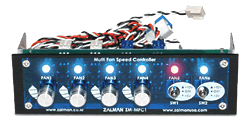
Yes, all AcoustiFans are compatible with manual fan speed controllers
like the Zalman MFC1 (right), or perhaps the Zalman FanMate 2 (which
is an internal device).
Manual fan speed controllers can be used with or without supplied AcoustiFan™ accessories to reduce RPM and noise levels to barely audible levels.
 :
Can the 3-pin AcoustiFan™ models be used the same as 2-pin
fans?
:
Can the 3-pin AcoustiFan™ models be used the same as 2-pin
fans?:
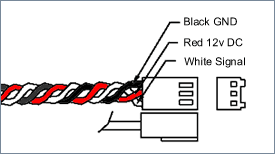
All AcoustiFan™ models use a 12VDC power supply across two wires:
the red and the black wires.
Black is GND and Red is normally +12VDC (this can be reduced to as low as +5VDC for slower, and therefore quieter operation).
The White (or Blue) third wire is the 'Signal' wire that normally supplies the motherboard with a pulse signal for RPM monitoring. The third pin on the fan connector does not need to be wired into a motherboard socket for the fan to function properly.
:
Which of the AcoustiFan™ models can I use as heat-sink fans (for example:
CPU heatsinks)?:
AcoustiFan™ C-Series fans are designed for quiet case cooling
at lower temperatures, so not for
use as heat-sink cooling fans. However, the AcoustiFan DustPROOF™ Series
are designed for multiple application quiet cooling and
can be used for cooling heat sinks, like a CPU cooler.
Therefore we do NOT recommend that you use AcoustiFan™ C-Series models with an oil-impregnated Sleeve Bearing for heat sink cooling. Heat sink cooling fans normally employ ball bearings or perhaps a 'Vapo' bearing - which are designed for operation in a higher temperature environment. The DustPROOF™ fan series are both low noise, and tolerant of higher temperatures.
:
Will fan speed monitoring and/or control functions built into my motherboard
work?:
This will largely depend on your motherboard. In the majority of cases, fan
speed monitoring through the motherboard will work as the AcoustiFan ™
range use a 3-pin 'Molex' fan connector with a signal wire giving the motherboard
a signal related to the fan's RPM.
Some motherboards come with case fan monitoring and/or control hardware/software 'utilities'. There is a possibility, however that the very slow spin of the AcoustiFan™ range may cause some issues with some motherboards with these built-in fan speed monitoring and/or control functions. We have previously found that very slow fan speeds will perhaps show as zero or the RPM may be shown erratically - not because the fans are not spinning or functioning correctly - but because the fan speed is below the threshold of the monitoring hardware/software. Occasionally, upgrading the motherboard BIOS to the latest version solves this, but sometimes nothing can be done to fix the problem. It is not a serious issue - because these features can be disabled in the BIOS.
:
Can the anti-vibe soft fan mounts be used in warm/hot locations
like attached to a CPU heatsink?:
Acousti Product's ultra-soft anti-vibration fan mounts are temperature
tolerant up to 70degC. Because they are made from a high quality
silicone rubber compound, they are temperature tolerant to higher
levels than alternative dampening materials (like natural rubber),
and not considered flammable or chemically reactive.
However, for an added margin of safety we would recommend that if they are installed in a hot location inside electronic equipment, that the installer takes care they are not in direct contact with any surface that will exceed 60degC for long periods.
Inside a PC, the mounts are best used in an area with good ventilation to aid cooling (i.e. in conjunction with a fan). If they are used in conjunction with a CPU/GPU cooling fan, it is best that the mounts are not attached directly to the hottest part of a CPU/GPU cooler (usually towards the base of the cooler), but rather a peripheral region. It is the responsibility of the installer to ascertain the suitability of the fan mounts for use with different designs of CPU cooler given the normal operating temperature limits.
Please send us feedback on this and other issues and we will add to the information listed here to help others.
Home | About | Solutions | News | Sitemap | Terms | Privacy | Contact
Acousti Products is a division of The Rack People™, a company registered in England & Wales
No. 04514007. Registered Office: Lifford Hall, Lifford Lane, Kings
Norton, Birmingham, B30 3JN UK (previously named Acousti Products Ltd
- change of name May 2013).
All Rights Reserved. Graphics and
content ©2013 The Rack People™
 Callback
 Message
 Online Demo